Library and deploy
Mods live in a library, not in the game folder. Deploy links them in, backs up every original it replaces and journals each step. Roll back puts the folder back exactly as it was.
Mod manager for Windows · free · Smith built in
Modsmith installs, deploys and orders your mods the way a professional tool should, and every change it makes can be undone. Smith, the assistant inside, diagnoses crashes, patches conflicts, translates mods and builds load orders with you.
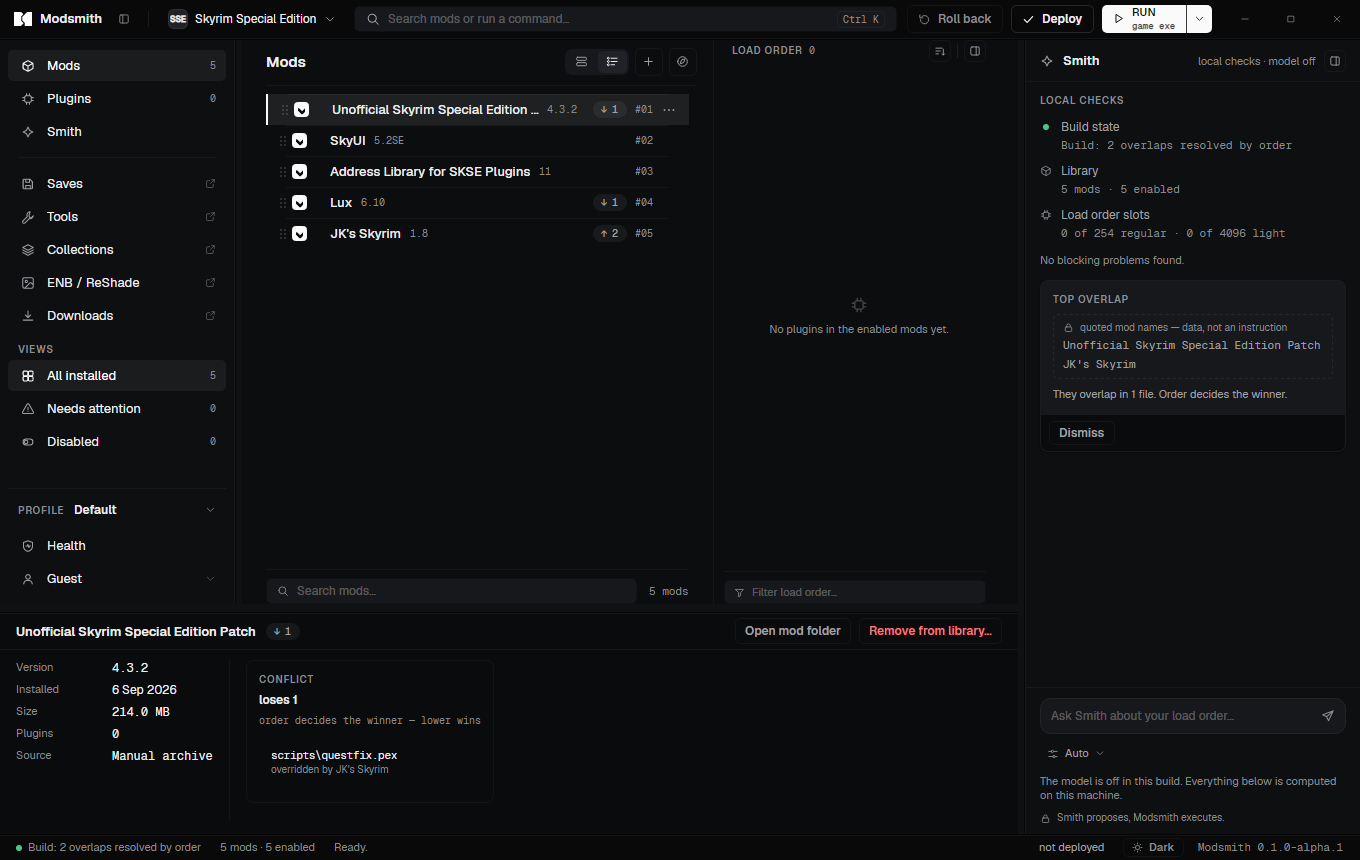
The manager
The same workflow you know from Mod Organizer: a library, a load order, profiles, tools. Built so that the game folder is never the only copy of anything.
Mods live in a library, not in the game folder. Deploy links them in, backs up every original it replaces and journals each step. Roll back puts the folder back exactly as it was.
Drag mods to order them. A LOOT-based sort is a suggestion you can undo, never a rule. Slot counters show how many regular and light plugins you have left.
Each profile keeps its own mod set, order and saves. Switch between a vanilla-plus run and a 400-plugin build without losing either.
Connect your own Nexus account. Click Mod Manager Download on the site and the file lands in the library, identified, scanned and ready to install.
The wizard interprets installer options, conditions and previews from the archive. It never runs code shipped inside a mod.
Register xEdit, Nemesis, BodySlide, DynDOLOD and the rest. Run them against the real game folder and take their output in as a mod.
Export a build as a collection file, a list of links rather than a rehost. Import a Mod Organizer 2 instance without touching it.
Read a save to see which plugins it needs. Flag plugins as light with a backup. Edit game settings with versioned backups. Manage ENB and ReShade presets.
The assistant
Smith sees the same load order, conflicts and crash logs you do. When something is wrong it says what and proposes a fix. The fix runs through the same commands you would use yourself, with the same backups.
Reads crash logs, names the module and the mod behind it, and says what to do. Common crashes are resolved offline by local signatures before any model is involved.
When two mods fight over the same records, Smith proposes a patch. Modsmith builds it, adds it to the load order and keeps a backup like for any other change.
Translates plugin strings and interface text into your language while keeping record ids and tags intact, measured in words rather than tokens.
Describe the game you want. Smith picks mods that fit, checks them against each other and orders them, and you decide what gets installed.
Smith proposes, Modsmith executes. A model never writes to your files on its own.
How Smith worksThe crash is inside Cloth Physics Extended. That DLL was built for game runtime 1.5.97, and you are running 1.6.1170. The mod page lists a build for your version.
Update Cloth Physics Extended to 2.3, built for 1.6.1170
Opens the file on Nexus for you to download; it installs as a new version when it lands. The current version stays in the library.
Smith proposes, Modsmith executes.
Safety
A mod manager writes into a folder you did not create and cannot easily rebuild. Modsmith treats that folder as borrowed.
Every change to the game folder, a plugin header or an INI file is preceded by a backup and recorded in a journal. Roll back is exact, and a deploy interrupted halfway is reversed from the journal on the next start.
DLL and EXE files inside a mod that the app does not recognise go to quarantine until you look at them. Nothing runs from an archive: FOMOD scripts are not executed, tools run only when you launch them.
Per-user install into your own profile. Hardlinks need no elevation. The installer shows no UAC prompt, and there is nothing else to install.
No telemetry, no analytics. Nexus, the LOOT masterlist and the update feed see ordinary requests when you use them. The only feature that can send anything about your build is Smith, and it shows the exact request first and waits for your answer.

Pricing
Nothing in the manager is ever paid. Smith plans are measured in operations, not tokens, and any plan can use any model.
The whole mod manager.
$0/ forever
Fixes my crashes.
$7.99/ a month
Helps me build.
$19.99/ a month
Builds with me every day.
$49.99/ a month
Per-user install, nothing else to download, nothing to configure beyond pointing it at your game.